
Feature Snap SHOT
Full Feature List
Profit & Cost Management
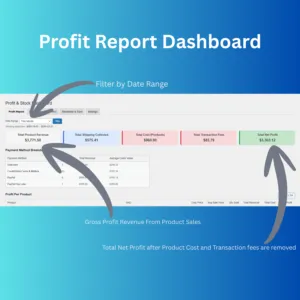
- Generates profit reports based on all WooCommerce sales, utilising user-defined cost price data for accurate calculations.
- Calculates weighted average sale prices per product to provide insights into pricing strategies.
- Supports flexible analytics with filters for date ranges, order statuses, and specific products.
Supplier Library
- Maintains admin-only supplier records, including name, contact information, email, website, address, and additional notes.
- Allows private notes per supplier for tracking warranty status, account issues, relationships, and other internal details.
- Designed for future linking to purchase orders and products for enhanced spend tracking and analytics (currently marked as a future feature).
Purchase Orders
- Enables creation of internal purchase orders (POs) with details such as order number, status, associated products, quantities, and estimated time of arrival (ETA).
- Supports selection of products and quantities per PO for precise ordering.
- Automatically increases stock levels when a PO is marked as "Received" to streamline inventory management.
- Tracks PO status options: Open, Received, Cancelled.
- Includes AJAX-based product search for efficient PO creation.
- Plans for future linking of each PO to a supplier for improved spend tracking (currently a roadmap item).
“Received” Stock take & Adjustment
- Provides a dashboard for bulk cost and inventory changes in a single action, reducing the need for multiple updates.
- Requires only one “Save Changes” button for all edits, simplifying the process.
- Includes pagination support for handling large product lists (default 50 products per page).
- Offers stock value summaries and total product counts for overview.
Bill of Materials (BOM)
- Supports Bill of Materials (BOM) for products, allowing detailed component listings.
- Enables easy PDF downloads for BOMs directly from WooCommerce order pages, with a custom print button using Dashicons.
- Features a clear UI and instructions for BOM entry, including placeholders for units and JavaScript-enhanced add/remove functionality for rows.
- Requires saving changes via the product's Update button in the Publish panel.
Barcode Printing
- Allows printing of barcode labels for products directly from the dashboard.
- Handles AJAX requests for label printing to ensure smooth user interaction.
Projections & Reports
- Generates 3-month sales projections and reorder forecasts based on historical data (last 90 days).
- Supports CSV exports for profit data and stocktake information for external analysis.
- Includes financial forecasting tools using real sales data, product costs, discounts, and order history.
- Accounts for transaction fees in profit calculations for comprehensive reporting.
- Provides daily recalculation of projections for up-to-date insights.
Settings and Configuration
- Features tabbed settings pages for Payment Gateway Fees, Stock Settings, and General options.
- Allows configuration of default low stock thresholds and email recipients for low stock alerts.
- Supports admin notes and other stock take customisable options for plugin behaviour.
Additional Features
- Integrates seamlessly with WooCommerce, requiring the plugin to be active.
- Adds cost price fields to WooCommerce product edit screens, Quick Edit, and supports saving via AJAX.
- Includes SKU auto-generation functionality via AJAX for efficient product management.
- behaviour Utilises custom post types for purchase orders with admin columns, metaboxes, and removal of public “view” actions.
- Employs FPDF library for generating BOM PDFs.
- Supports multilingual capabilities with POT files for translations.
- Enqueues necessary assets (CSS/JS) and handles permissions for WooCommerce management access.
-
Sale!
Inventory, Pricing and Stock Manager
Original price was: $199.00.$99.00Current price is: $99.00. Add to cart