Description
Inventory, Pricing & Analytics for Woo
The ultimate “Command Centre” for high-growth WooCommerce stores.
Stop managing your business through a dozen spreadsheets. Inventory, Pricing and Analytics for Woo is an all-in-one powerhouse designed for shop owners who need total control over their supply chain, profit margins, and future growth. From tracking individual bolts in a kit to predicting next month’s revenue, this plugin turns your raw data into actionable intelligence.
Key Features:
Profit Dashboard
A powerful Profit & Stock Dashboard for WooCommerce, designed to give store owners clear, real‑time insight into store performance and profitability. The dashboard focuses on actionable metrics, making it easy to understand where revenue and profit are coming from at a glance.
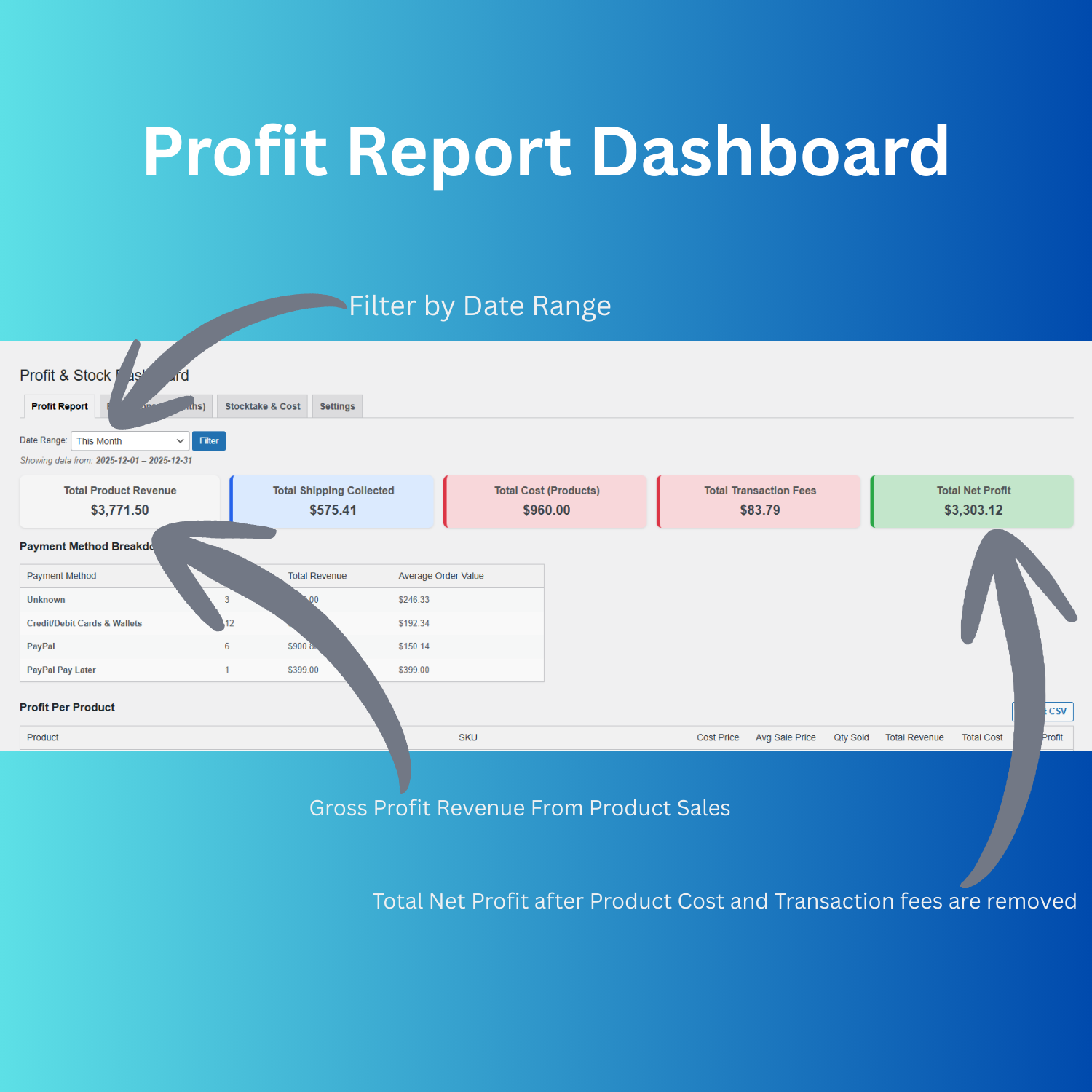
At the top, colour‑coded summary tiles display Total Product Revenue, Total Shipping Collected, Total Cost (Products), Total Transaction Fees, and Total Net Profit for a selected date range. Store owners can quickly filter by period using the built‑in date range selector, allowing fast month‑to‑date or custom range performance checks without leaving the screen.
Below the summaries, a detailed Payment Method Breakdown table shows orders, total revenue, and average order value per payment method, helping merchants identify the most valuable payment options for their customers. A dedicated Profit Per Product section further down lists individual products with their cost, sale price, quantities sold, revenue, cost, and total profit, giving granular visibility into product‑level margins.
The dashboard also includes a convenient Export CSV button, enabling store owners to download their profit and stock data for deeper analysis or sharing with accountants and business partners. Overall, it delivers a clean, merchant‑friendly interface that centralizes key profit metrics and makes financial reporting for WooCommerce stores faster and more transparent.

Stocktake Dashboard
A comprehensive Stocktake, Cost & Pricing Update dashboard for WooCommerce stores, purpose‑built to simplify inventory control, margin management, and stocktakes.
This tool displays live total stock value (cost) alongside total retail value, giving store owners instant visibility into how much inventory is on hand and what it is worth at retail. A clean tabbed layout integrates with existing reports and settings, making it easy to jump from profit projections straight into detailed stock and pricing adjustments.
At product level, the interface presents a powerful editable table showing product name, SKU, stock management toggle, current stock with low‑stock alerts, stock adjustment fields, cost price, RRP, RRP % profit, sale price, sale % profit, stock status, and label printing controls. Merchants can update quantities, costs, RRPs, and sale prices inline, or use bulk actions to apply changes across multiple items in a single operation, making stocktakes and price updates significantly faster.
Designed for daily operations, the dashboard helps identify low‑stock products at a glance, switch items in or out of stock, and print individual product labels directly from the same screen. The result is a streamlined, merchant‑friendly control panel that centralizes stock, cost, and pricing management for busy WooCommerce stores.
Intelligent 3-Month Projections
At the top of the screen, a highlighted forecast panel summarises Projected Revenue (Next 3 Months) and Average Daily Sales (Storewide), calculated automatically from historical performance. This high‑level view lets store owners instantly gauge expected turnover and sales pace for the quarter ahead.
The lower section lists each product in a structured table with columns for current stock, average daily sales (units), estimated days of stock left, projected 3‑month demand, and an easy‑to‑scan status indicator. Products that are likely to run short show clear warnings such as “Out of Stock”, while healthy lines show “OK”, helping merchants prioritise reorders and avoid overselling.
By combining live inventory levels with real sales velocity, this forecasting view transforms raw store data into practical purchasing guidance, highlighting which lines to restock, when, and in what quantity. It is ideal for owners who want proactive inventory planning rather than reacting to stockouts after they happen.
Supplier & Purchase Order Management
Centralise your vendor data. Create, track, and manage Purchase Orders (POs) with automated status updates and ETA tracking, ensuring your shelves are never empty.
Granular Bill of Materials (BOM)
Perfect for automotive, electronics, or furniture shops. Break down complex bundles into individual components to track the exact cost and stock levels of every nut, bolt, and bracket.
Bulk Pricing Control
React to market changes in seconds. Use the Global Pricing Update tool to increase or decrease RRP and Sale prices across your entire inventory by percentage or fixed value.
Why Shop Owners Love Inventory, Pricing and Analytics for Woo:
-
Eliminate Overstocking: Only buy what you actually sell.
-
Protect Your Margins: See the real-time impact of shipping costs and gateway fees on your bottom line.
-
Professional Reporting: Export clean CSV data for your accountant or team with a single click.
Reviews
There are no reviews yet.